Bungie Answered
Voice Chat Problem

PC, Steam, Windows 11
I followed the guide here https://help.marathonthegame.com/hc/en-us/articles/46853995013652-Audio-Voice-Troubleshooting and my Headset is functional both in other games and in terms of settings.
I can speak and be heard, but not hear my teammates. I *can* hear them if I set the output to my external speakers, but cannot hear them clearly through my headset.
This is really handicapping my ability to do more progressive play, so any help is appreciated.
1

Comments
Hi!
Thank you for reaching out. I'm sorry to hear you're having issues hearing your teammates through voice chat.
A few things to check:
Another thing you may want to try is to check your MTU settings, as described in our FAQ article:
Please let me know here how it goes!
1. Yes it is bluetooh/wireless. A Sony WH-1000XM4 to be precise (Sony store page: https://electronics.sony.com/audio/headphones/headband/p/wh1000xm4-b)
2. This headset is indeed dual-channel.
3. I've tried 3 headsets -- my primary WH-1000XM4, a Bose 700 (https://support.bose.com/s/product/bose-noise-cancelling-headphones-700/01t8c00000OydA4AAJ?language=en_US), and a Nubwo G06-BT (https://www.nubwotech.com/search?type=product&q=G06&srsltid=AfmBOoqMUVPUkXDcz-b6NWkwA4IUGzwsufGK9eQMOQKkz82GMXDNAOZV). All wireless. All the same problem. I do not have a wired headset available.
Other games/apps do not have this headset issue.
I checked my MTU as well, and it is automatically set to 1500 , attached image below: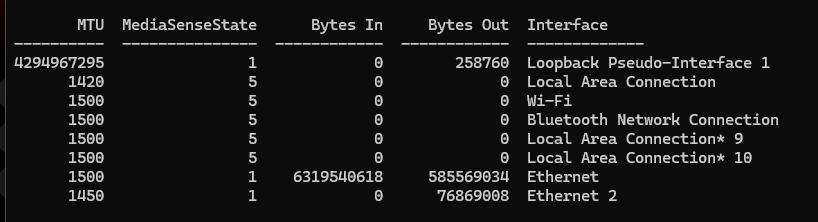
I really am not sure what else to do. Please help me.
Hey there,
Thanks for the follow-up, I appreciate the detailed response! Please forgive me for the delayed answer.
I'll send this over to the developers for further investigation, but before I do, could you please confirm if only the voice chat audio isn't coming through your headphones, or does this affect game/environment audio as well?
Not a problem, I really appreciate that you are taking the time to address this.
The voice chat audio doesn't come through my headphones, but the game audio does. I can use my microphone when my headphones are on. When my headphones are off -- any model headphones -- then I can hear the voice chat, and technically speak through another microphone, but this is suboptimal given the importance of game/environment audio.
Thank you for your time, looking forward to hearing back.
Hello just following up to see if there's any update on this?
Hi again!
Thank you for the update and added information. Sorry for the delay!
I've saved your report and your screenshot of your MTU settings and escalated your case to the developers so they can have a closer look. We'll be investigating this on our end.
I appreciate you flagging this and thanks for your patience while this is being looked into!
Hello, just checking in to see if there's been any movement. I'm aware things have been a bit hectic, still have to check in. Thank you all for everything you do.
Hi again, thanks for checking in.
At this time, I unfortunately don't have any updates on the issue but can confirm it is still being tracked. We have received another similar report from a player who had this issue, and it seemed that their "Voice Audio Output Device" (under Settings -> Social) was swapped out to something else and swapping it back fixed it. If you haven't tried that already, it might help as a temporary fix, but we are still investigating this on our end in the meantime.
Thank you I appreciate the reply. I did already try the Voice Audio Output Device swap prior to making my original post back in May and occasionally try it again with each new update.
I understand that this is a niche issue, however I hope we get around to it some day.
Please sign in to leave a comment.