Bungie Answered
Headset Mic Stops working after a round After Update 1.1

After Update 1.1 Headset Mic Stops working after a round.
Once you get back to the lobby the mic stops working, i have to leave team and restart the game.
It works fine if i don't use lobby chat in discord, and was perfectly fine before the update.
0

Comentários
Hi there,
Thank you for reaching out.
Please try these troubleshooting steps:
Fully close Marathon and Discord, then relaunch the game and test voice chat without Discord voice/lobby chat running.
On Windows, press
Windows key + R, typemmsys.cpl, and press Enter. In both Playback and Recording, set your headset/mic as the Default Device and Default Communications Device.In Marathon, open Social Settings and make sure the correct communication device is selected.
Make sure Crew Voice Chat is enabled and that your mic is unmuted in the lobby and in-run.
If you’re using a Bluetooth/wireless headset, try a wired headset or another audio device if possible.
If the issue still happens, please send us your platform, headset make and model, whether it’s wired or wireless, whether Discord/OBS/VPN is running, and screenshots of your in-game audio settings and Windows sound settings.
You can also check this guide: Audio & Voice Troubleshooting.
hi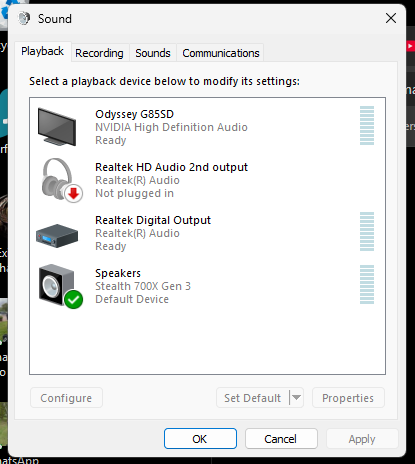
i followed 1-4 all where correct.
5 i dont have a wired headset.
Discord isnt running, and no vpn.
My headset is a turtle beach stealth 7 gen 3, wireless.
This is only happening in game chat. I can speak in the lobbey pre game, and in game. I then extract or return to lobby, then then push to talk doesn't work, i have to reset my game to then come back in and talk.
I have also tried entire games, no game chat and used discord instead no issues, also tried in other games , no issues.
this has only started happening since the update, and its almost every game.
cannot insert the game shot but it is selected
Hi there,
Thanks for the screenshot and for the details.
Could you please try the following:
If the issue continues after these steps, please also share a screenshot of your Windows Recording devices tab so we can confirm the headset mic is the active or default input device.
while running open mic., it does not cut off,. only on push to talk
Por favor, entrar para comentar.