Bungie Answered
Game is crashing non stop.

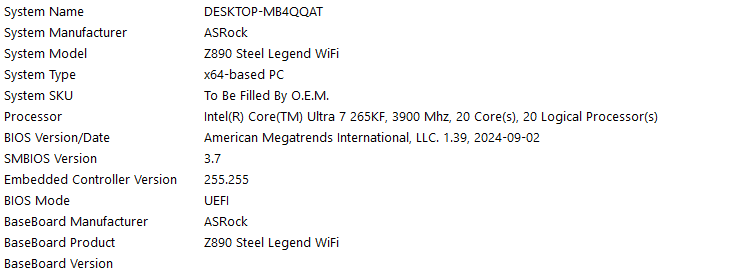 Game has been crashing since the update, friend has nearly the same specs and is working fine with no issue.
2

Commentaires
Hi there,
Thanks for reaching out. We're sorry to hear you're dealing with this frustrating situation.
We can confirm the team has received reports of crashes of this nature and is looking into the situation. We appreciate your patience.
Update your BIOS to the latest release and the Intel Management Engine to the latest release, check the motherboard manufacture website for both. I did this and my crashing issues are resolved (I have a Core Ultra 7 265KF as well).
I updated the ME yesterday and My BIOS tonight after realizing my BIOS did not update like I thought it had, and my game no longer crashes. My specs are very similar to yours.
https://www.reddit.com/r/Marathon/comments/1rxq5b6/comment/ob8w0kc/
Hello again everyone,
The fix I came up with yesterday was:
Updating your BIOS (dont do any tuning apart xmp/expo) and Intel Management Engine.
After that I suggest also:
Go to the location where your game is installed, for me its C:\Program Files (x86)\Steam\steamapps\common\Marathon\battleye
Right click on Uninstall_BattlEye -> Run as Administrator -> uninstall it
Then
Right click on Install_BattlEye -> Run as Administrator -> install it
You can also just delete the insides of this folder and game/steam will redownload it back.
If that doesnt work then I am out of ideas and this probably needs official fix.
Vous devez vous connecter pour laisser un commentaire.