Bungie Answered
Game crashing every raid*

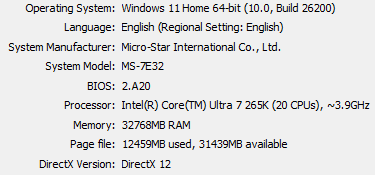
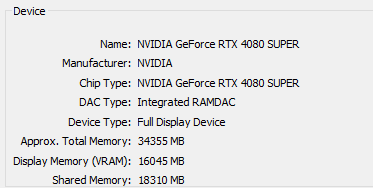
Constant game crashing with this setup. Did the following:
- Updated nvidia drivers (tested 581.08, 595.79)
- Disabled DLSS
- Updated intel ME
- Disabled all overlays
- Updated any out of date drivers via MSI Center
And ran normal shell, solo and party, which ends in a crash in the first 5 minutes or so. Weirdly enough, Rook runs seemed to play out just fine?
12

Commentaires
Hi there,
Thanks for reaching out. We're sorry to hear you're dealing with this frustrating situation.
We can confirm the team has received reports of crashes of this nature and is looking into the situation. We appreciate your patience.
Upvoting so they fix this alreadyyyyy
Same problem, Everything worked fine before the update. Now I cannot run a raid
Same here, can't even play over 3 mins. Never got this issue before this patch.
Yep, I have the same crashes with a Core Ultra 9
I was able to play 2 days ago, now I can't even load into a single match without crashing to desktop. I have updated all my drivers and BIOS.
GPU: Asus RTX 5090 Astral
Processor: Intel(R) Core(TM) Ultra 7 265K, 3900 Mhz, 20 Core(s), 20 Logical Processor(s)
Motherboard: TUF GAMING B860M-PLUS WIFI
RAM: 64GB
Yup same sucks can’t even play the game just crash OVER AND OVER
From what I've read in the Discord general chat, it might have something to do with Intel Ultra processors... that seems to be a recurring theme.
Same here, upvotin so that this gets fixed or at least acknowledged
Hello again everyone,
The fix I came up with yesterday was:
Updating your BIOS (dont do any tuning apart xmp/expo) and Intel Management Engine.
After that I suggest also:
Go to the location where your game is installed, for me its C:\Program Files (x86)\Steam\steamapps\common\Marathon\battleye
Right click on Uninstall_BattlEye -> Run as Administrator -> uninstall it
Then
Right click on Install_BattlEye -> Run as Administrator -> install it
You can also just delete the insides of this folder and game/steam will redownload it back.
If that doesnt work then I am out of ideas and this probably needs official fix.
Updating BIOS via USB worked for me
Vous devez vous connecter pour laisser un commentaire.