Bungie Answered
Battle Eye Error

I played Marathon earlier today without issue. Now, when trying to start up I am getting the following error: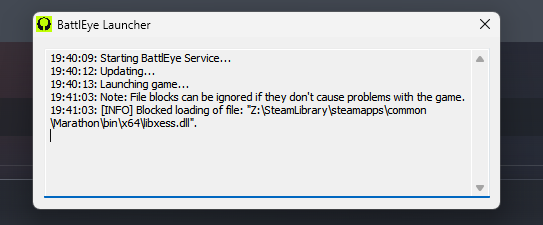
I have uninstalled/reinstalled Battle Eye, I have run Steam as admin, and other ideas that I have seen online as well as here. Still unable to launch the game now.
0

Comments
Hi again,
We just wanted to check in and ask if you are still experiencing the BattlEye error when trying to launch the game?
Not sure if we are supposed to add onto existing posts but wanted to say that I started getting the same error around the same times.
Bungie ID: DJIsaacNewTune#1806
Playing on steam. Played fine at 5:00 PM EST, couldn't launch it by 6:15 EST.
I've tried uninstalling and reinstalling battle eye, uninstalling and reinstalling the whole game on two different drives, verifying files on steam, and adding system level permissions to the battleye folder.
Hello there,
Thank you very much for reaching out to us. I'm sorry to hear that you are having issues getting into the game due to an issue with BattlEye. We'd recommend going through BattlEye's FAQ page if you haven't already. If that doesn't help, we'd recommend reaching out to their support team for further assistance.
did reaching out to battle eye provide any helpfull fixes im stuck with the same problem and am at a loss
I did a full re-install and restarted my PC several times, and one of those two things finally fixed the issue. I am not sure which one as I did not try launching in between the restarts (as I got sidetracked into looking at other things). So unfortunately, I can't give a clear answer as to what worked, but something did. So I suggest reinstalling and restarting to see if that helps.
I have done multiple restarts, reinstalls, unistalled and reinstalled battleye specifically, nothing has changed. I've requested support with the battleye team just now. Fingers crossed.
Please sign in to leave a comment.