GOJI error after 1-2 minutes in menu / seconds after loading into match on Steam PC

Platform: Steam / PC
Region: Poland
Connection: wired Ethernet
I am repeatedly getting error code GOJI. This error code is not listed in the Marathon error code articles.
Behavior:
- I can launch the game and reach the menu.
- After about 1-2 minutes in the menu, I get kicked with GOJI.
- If I queue into a match, I can sometimes load in, but I get kicked after a few seconds.
- A few times I was able to move/play in short fragments before being kicked again.
- I have also seen YAM occasionally, but GOJI is the main recurring error.
- This has made the game unplayable locally.
Important test:
- The same Steam/Bungie account works on Boosteroid cloud gaming.
- That suggests my account/entitlement is not the issue and the game servers are reachable from another environment.
Troubleshooting already tried:
- Reinstalled Marathon completely through Steam.
- Steam finished a fresh install/build correctly after reinstall.
- Verified/finalized the Steam install.
- Reinstalled/refreshed BattlEye from the Marathon folder.
- Cleared Marathon local prefs/cache.
- Cleared old BattlEye Marathon local cache.
- Restarted Steam and Marathon multiple times.
- Rebooted/restarted networking.
- Tested wired Ethernet.
- Tested T-Mobile mobile hotspot.
- Tested Cloudflare WARP.
- Tested Proton VPN / WireGuard.
- Tested ExitLag.
- Tested Windscribe/WireGuard style routing.
- Disabled VPN/tunnel services and adapters.
- Disabled Cloudflare WARP, Windscribe, Proton, ExitLag, Hamachi, ZeroTier, Radmin, HotspotShield.
- Disabled Wi-Fi and used Ethernet only.
- Removed stale UPnP mappings.
- Allowed Marathon through Windows Firewall.
- Added/confirmed UDP 3074 and 3097 rules/mappings.
- Cleaned old virtual adapter bindings, including VirtualBox bridged networking on Ethernet.
- Checked DNS/proxy/firewall basics.
- Confirmed normal HTTPS connectivity to Bungie/Marathon sites works.
This is not general packet loss or no internet. The game signs in and sometimes loads into a match, then the session gets disconnected by GOJI shortly after.
Please escalate this as a PC/Steam GOJI issue. I need to know what GOJI actually means and what logs or diagnostics you need, because the public troubleshooting guide does not cover this error.

Comments
Hi there,
Thanks for reaching out.
Error code GOJI indicates that Marathon has detected a problem with your computer that may be in violation of Bungie's Terms of Use.
You will be unable to play Marathon on PC until you fix the issue on your computer.
same problem i tried more than 15+ methods to fix that but 0 changes. Just need to wait any patch with fix...
Having the same issue.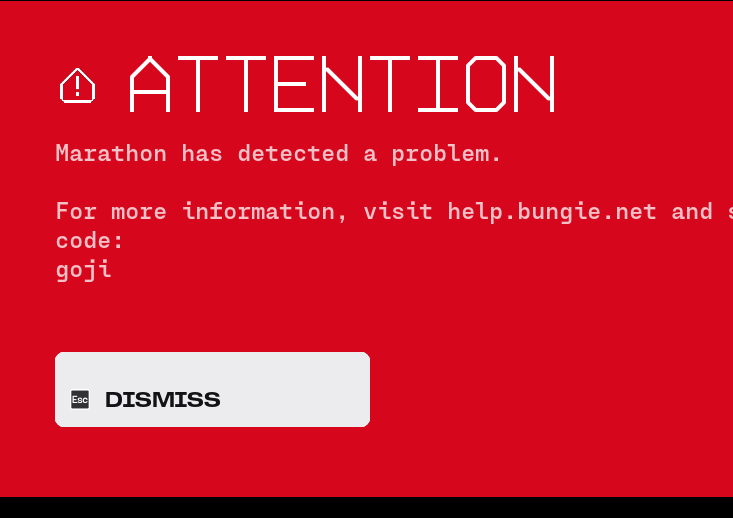
just got banned from this. got GOJI. then a not so fast screen. LMFAO joke of a game
Wdym amikam, could you elaborate?
Aridlin || rust was playing a match of dire marsh sponsored (night) just doing tasks. i was getting "contacting marathon servers" at the bottm of the screen and thought okay im just lagging. so i carried on. and then got the error code GOJI screen. and before i could search up what it meant i got the "NOT SO FAST !" screen and was told my account was banned. after searching up the code it has to do with poor connection quality. im on starlink in the middle of a very rural place ~3000 people. so lag is expected but after searching the ban policy - bungie basically says " we reserve the right to ban/restrict accounts based on poor connection quality because it affects other players" this is digital discrimination if ive ever heard of it. not only did i buy the game. i bought the reward pass to just be robbed because of my connection - no other pvp games i've played have had an issue except marathon. i'll never purchase a game or content from bungie again. im under the impression they dont know what theyre doing over there anymore.
Bungie Support that doesnt help any of us at all. what could possibly be infringing on the terms of use ? like... for example i have a brand new computer i just spent $4k on (literally out of the boxes and built). maybe point us in the direction of how to fix it ? this is highkey digital discrimination guys.
excuse me? BANNING over poor connection?
kicking or temporary bans could at least have a reasoning
BUT BANNING ON A PAID GAME? IN THE FUCK THEY MEAN?
that is just.......
well thats just bungie
no fucking wonder marathon is soft-dead rn, with this shit i hope its fucking in the ground alongside day of defeat
Having the same problem. Wanted to try it out on free weekend but couldn't get past menu screen. I do not know what is the issue with my pc. It does not tell me how to fix it. Support is unhelpful.
Redacted4893
i have fixed it by dualbooting 2 windowses, search up a tutorial
its stupid, bungie is stupid but its the only way that surely works
Please sign in to leave a comment.