Bungie Answered
Parent Permissions Not Updating

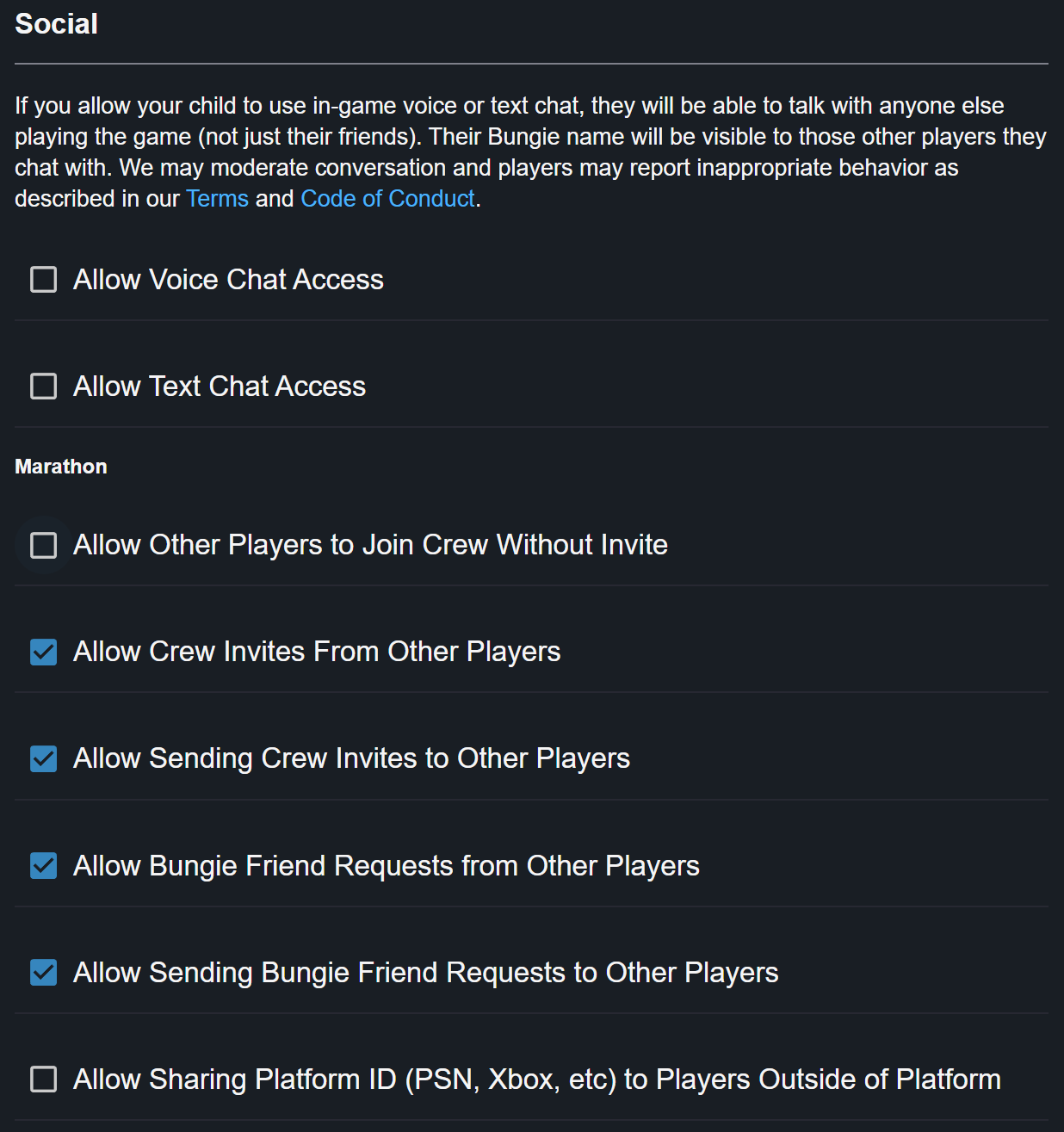
I've gone through the trouble of making and linking my son's Bungie account to mine and I've updated his permissions on the web page, but it's not allowing me to update any of the restrictions on his profile in game. I've checked all the boxes I wanted to for his account (see below) and nothing has changed.
Very frustrating to have to work through all of these hoops just to have it not work.
3

Comments
Hi there,
Young players (aged under 13, or their country’s age of digital consent) will need to link their account with a parent, guardian, or other responsible adult’s account in order to access certain features, such as joining text or voice chat. The parent, guardian or other responsible adult needs to have a Bungie.net account and verify that they are an adult.
Please review our Date of Birth Requirements article for more information and setup instructions:
https://help.bungie.net/hc/en-us/articles/24217906958868-Date-of-Birth-Requirements-for-Destiny-2-and-Bungie-Services
If you are encountering issues after setting up Parental Controls, there might be an issue with the Parental Control settings on the platform you use to play. Please reach out to your platform's support team for assistance with troubleshooting your platform's Parental Control settings.
Hi I am having the same issue. I did the account creation and linking for my son but none of the changes are going into effect on his account. He plays on Xbox
I am also having the same issue. It ONLY pertains to marathon. Ive linked his account to mine and enabled all of the communication permissions under parental controls, but he still cannot use voice chat or text. This needs to be fixed immediately or I want a refund on the game. Its been two weeks.
I am also having this issue and I emailed and filled out a help request and haven't gotten help after spending $80 on this product with overly complicated protection settings.
Why is this not being addressed? I posted over a week ago and haven't received a response. There are people who paid for this game and aren't able to play it properly because you cant be bothered to follow up on your own parental permissions policy. If I have to jump through all of your hoops to verify I'm an adult and link my account to my son's then the least you can do is hold up your end of the bargain. This kind of general neglect is why your studio is having to overcome so much bad press to find success with Marathon. Why even have a forum if you aren't going to read it?
The issue eventually resolved itself. I think I signed in on the child’s account and changed the permissions from there rather than changing it from the adult’s account where you would think to go. I am not sure if that is what fixed it but we are playing together now.
Please sign in to leave a comment.