Windowed Mode - Windowed game bounds exceed screen and task bar

Bungie Name - Marine Vet#1167
Platform - Steam
Description of Issue - I use a Ultrawide Monitor, however play in windowed mode. The Windowed mode exceeds my vertical bounds and can not be adjusted. This seems to be due to the top bar, possibly a issue of scaling internally. Resolution and scaling are correct. Seems as though a easy fix for this, like other games would be to allow resizing of the windowed screen with mouse. However can not do this in Marathon. Due to this I am missing portion of bottom. With task bar set to show the windowed mode loads below into the task bar and if you auto hide task bar trhe game still shows outside bottom of screen
Date Time - 2/26/26 4:544CST
Repro Steps - Utilizing a Ultrawide, in this case Samsung G9 place graphics to 2560 x 1440 and place in windows mode

Comments
Hi there,
Thanks for reaching out and reporting this!
If the issue persists, could you please capture a brief video that shows the issue in action? You can upload the footage to a public video hosting site, like YouTube, then post the link here and we’ll be glad to take a look.
It's just that the game won't snap to an edge of the monitor and there's also no option to simply resize the window. I've tried to change launch options in Steam but the game still is forced to launch at whatever resolution it's set to in game. The bottom part of the game is cut off because of the window screen, there's not much a video would demonstrate. The client simply needs the ability to be manually resized for custom resolutions in windowed mode.This forum also won't let me attach a screenshot for some reason but just imagine not being able to see the bottom 5-10% of your screen.
I have the same issue. I can't seem to get the game to work fullscreen in my native 3820x2560 it only shows 3820x1600 and it gives me a gap at the bottom of the screen
Same problem here on ultrawide 21:9 monitor when trying to play 16:9 in windowed mode, the application bar on the top take space from the bottom part of the game.As you can see 2-3 cm on the bottom aren't visible
Fix for Windowed Mode Exceeding Screen Bounds on Ultrawide Monitors
Monitor: Samsung G9 (5120×1440) Platform: Steam
Problem: Playing Marathon in windowed mode at 2560×1440, the window title bar pushes the game past the bottom of the screen, cutting off the lower portion. The game doesn't allow manual window resizing or custom resolutions through its in-game settings.
Solution:
C:\Users\[YourUsername]\AppData\Roaming\Bungie\Marathon\prefs\cvarsfile in a text editor (Notepad works fine). Make a backup copy first.window_modefrom0to1— this enables borderless windowed mode, removing the title bar while keeping your chosen resolutionwindowed_resolution_heightto your screen's working area height (screen height minus taskbar). To find this, open PowerShell and run:Add-Type -AssemblyName System.Windows.Forms; [System.Windows.Forms.Screen]::PrimaryScreen.WorkingAreaUse theHeightvalue it returns. In my case it was1392.window_position_yto0to push the window flush to the top of the screenResult: The game runs at 2560×1440 without a title bar, fits perfectly above the taskbar, and the cursor is properly confined during matches. The in-game Window Mode dropdown will appear blank since this is an unofficial mode, so avoid hitting Reset in the video settings or you'll need to re-edit the file.
Bungie should add these options in game, but this is the workaround that I found precisely useful.
I tried following Blackcover11's solution but it doesn't seem to be working. I wish to play the game in Borderless 4k (3840x2160). The game still launches at my native resolution in windowed mode and the next lowest in 3440x1440. Are my prefs settings correct? Could anyone help please?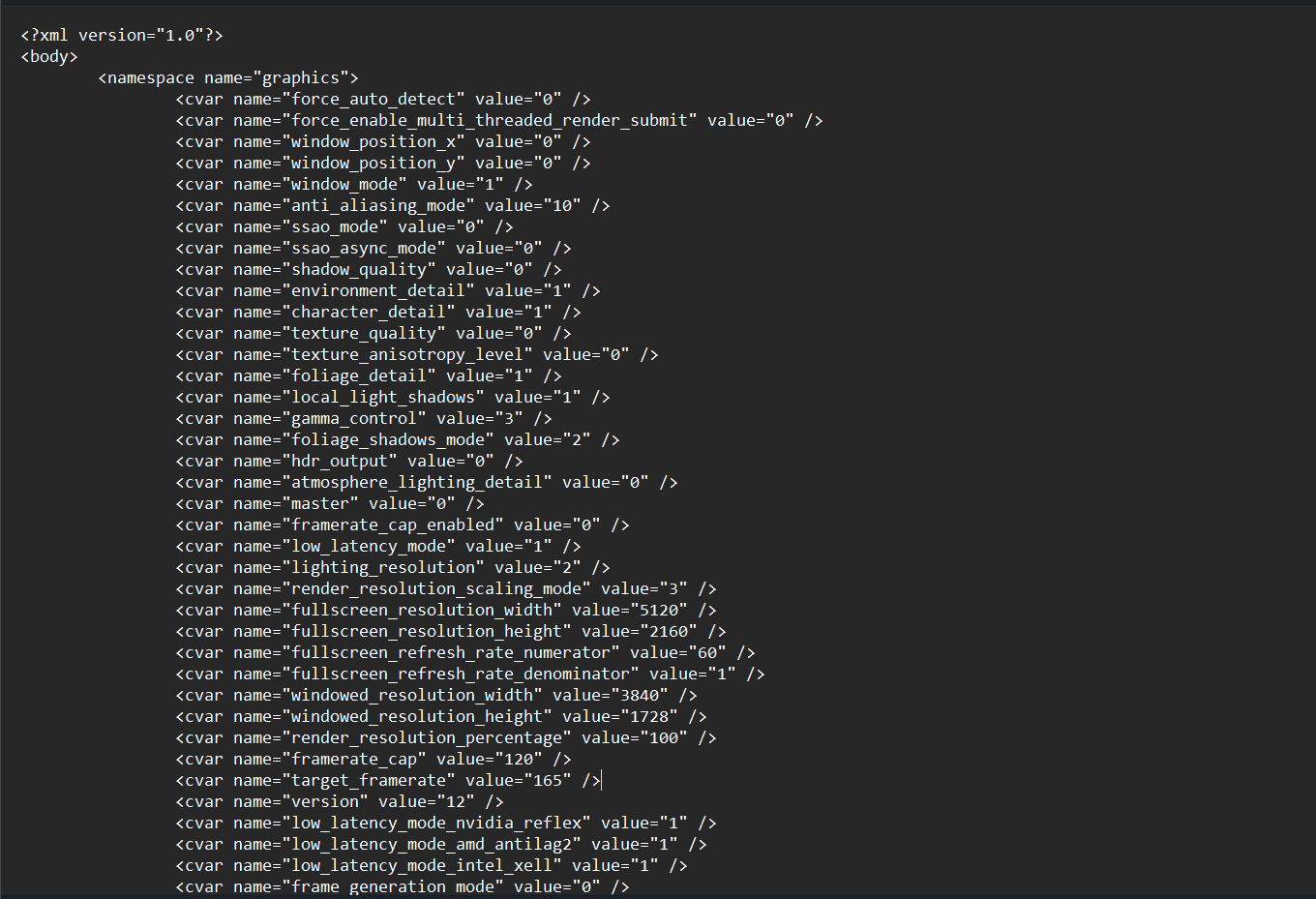
Please sign in to leave a comment.