Bungie Answered
BattlEye is blocking Marathon.exe? Bricked?

I've validated my steam data. installed the latest drivers and rebooted. this is borked and there isn't anything obvious.
I have been playing since launch.
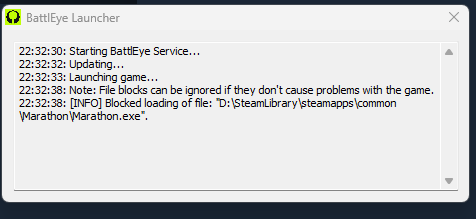
22:32:30: Starting BattlEye Service...
22:32:32: Updating...
22:32:33: Launching game...
22:32:38: Note: File blocks can be ignored if they don't cause problems with the game.
22:32:38: [INFO] Blocked loading of file: "D:\SteamLibrary\steamapps\common\Marathon\Marathon.exe"
0

評論
Hi there,
Thank you for your report.
BattlEye is our anti‑cheat, so if it’s blocking Marathon.exe (or showing a “blocked loading of file …” message), that usually points to a conflict with another program or a BattlEye install issue rather than your game being permanently bricked.
Since you’ve already verified files, please try the following in order:
Check how you’re launching
Make sure you’re starting the game by pressing Play in Steam, not by running Marathon.exe directly from the folder.
Repair / reinstall BattlEye
Close Steam completely.
In your Marathon install folder, look for a BattlEye subfolder and run the uninstall file, then the install file (or reinstall via Steam’s “Verify integrity” one more time).
Relaunch Steam and try again.
Temporarily disable or whitelist security software
Third‑party antivirus/firewall tools (most commonly Kaspersky, Avast, etc.) can cause BattlEye to block the game even if they were fine before.
Temporarily disable them and try launching.
If that works, add exceptions for:
Marathon.exe
The BattlEye launcher in the game folder
The BEClient_x64.dll file inside the BattlEye folder
Close overlays and injectors
Fully close things like MSI Afterburner/RTSS, RGB/“tuning” tools, screen recorders, and overlays (Discord overlay, GeForce Experience in‑game overlay, etc.) and then try launching again.
Run once as administrator
Right‑click Steam > Run as administrator, then launch Marathon from Steam.
If it’s still failing, the key thing that will help us is the exact BattlEye error text (or a screenshot of the BattlEye window) and which antivirus/security tools you’re using. If you can reply with that, we can narrow down whether this is a known conflict or something we need to dig into further.
I'm having the same issue. I've now tried:
At this point I've paid for a game I've never even gotten to play, especially while putting my computer at risk of cyber attack or malware. Big bummer :(
請登入寫評論。