Bungie Answered
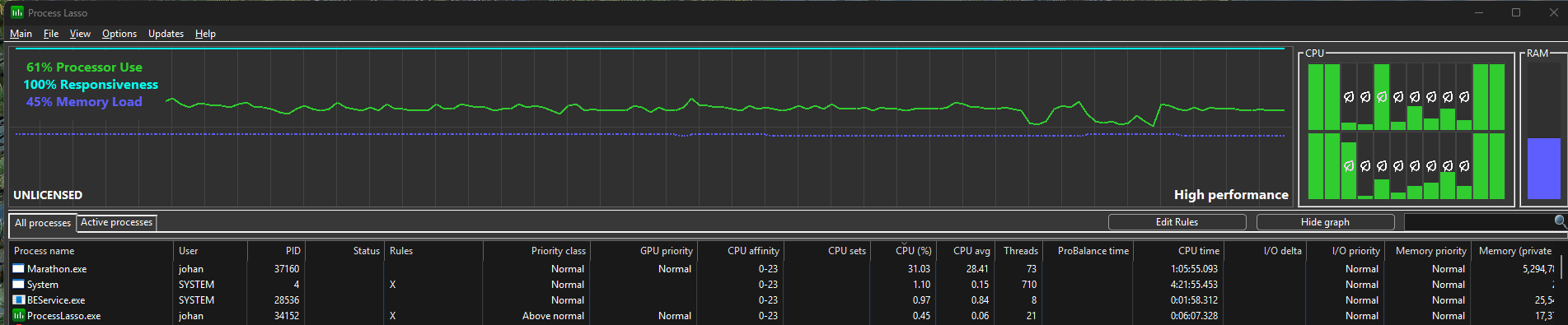
Server slam client maxes 100% cpu use on all p-cores even in loadout/ui - it wasn't like this in previous test

2

Комментарии
Hi there,
Thank you for the report in sharing your experience and system specs. Rest assured that performance tuning is ongoing!
If you haven't yet, we recommend posting this into one of the following channels on our official Discord as well for the best visibility:
I had a lot of fun in the server slam and looking forward to release, but the performance was very poor, hitting only 100-160fps with stable overclocked 285k and rtx 5090, no settings change did any difference.
I started troubleshooting and instantly saw that from the time you reach the login screen, all p-cores are at 100% load 100% of the time ingame, menus, loadout/ui etc.
(To see this you need to use proper per-core monitoring like resource mon in task manager or process lasso which has very nice graphing, otherwise your total "cpu usage" will just say 50% or so since most cores are un-used - see picture).
Was there some extremely aggressive/defective debug tool in this client that ruined it? I happened to have an older test client still installed on my computer, and when I start that it does not have the issue. I also do not recall the older test having performance issues.
You can still test this for yourself btw even though the test has ended, cpu use spikes even before you click to login.
***The processes are sorted by cpu usage. Only Marathon and battleeye uses any significant cpu whatsoever, as you can see***
I can add that it's the same with the old/todays marathon game ready driver.
I can also add I did not even have process lasso installed until I started troubleshooting, so it is not affecting any results.
Войдите в службу, чтобы оставить комментарий.