Crash to desktop - Signing in

Wanted to make a post about this to hopefully draw more attention to this issue as seemingly I and others are not able to even get into the game.
Every time I click through the main menu and the game starts the sign in loading screen, the game will quickly freeze and then crash to desktop. I've had no issues before this most recent patch.
Things I have tried
- Running as the game as administrator
- Updating my gpu drivers, bios, and windows
- Disabling all overlays
- Verifying game files
- Uninstall/Reinstalling the game
- Disabling my firewall
- Clearing marathon's roaming data
- uninstalling and reinstalling battle eye
Here's my pastebin for my dxdiag https://pastebin.com/Drk3H0E9
Really hoping this gets fixed soon cause I have not been able to play since the update T^T

コメント
Hi there,
Thank you for reaching out.
It sounds like a crash tied to either the anti‑cheat / startup services or something in your system environment that Marathon is now hitting differently.
On top of what you’ve already tried, a few more targeted checks:
Fully clean boot & minimal environment
Do a clean boot of Windows (no non‑Microsoft startup services), then launch the game with:
All overlays, GPU tools, RGB apps, hardware monitors, and VPNs fully closed/uninstalled (Afterburner, RTSS, Armoury Crate, iCUE, etc.).
Test again and see if it still crashes at sign‑in.
Check Windows Event Viewer
Open Event Viewer → Windows Logs → Application right after a crash.
Look for an Error that mentions Marathon.exe or your GPU driver (nvlddmkm / amdxx) and grab:
The faulting module name and
The error code / description.
System file & OS health From an elevated Command Prompt:
Run: sfc /scannow
Then: DISM /Online /Cleanup-Image /RestoreHealth
Reboot and test Marathon again.
Different driver branch test even if you’re on the latest driver, try:
Doing another clean install of your GPU driver (only driver + PhysX for NVIDIA / minimal package for AMD).
If you’re already on latest, test a slightly older WHQL version; if you’re on an older one, test the current recommended version.
Some additional Info
Username: Peachiko#1049
This is what I see before it cuts to a black screen and crashes (this happens within about 5 seconds of the freeze)
Hello!
I have the exact same problem. It has tarted today. Yesterday the game worked fine
I'm having the same problem.
My processor is a 5800x3d.
They are saying that after the update, there may have been an error in x3d processors.
Has anyone managed to solve this?
I was playing normally too.
I'm also experiencing this issue since the update yesterday and have tried most of the solutions mentioned to no avail.
I have the same issue but my friend does not I'm starting to think is a windows 10 problem. Are you guys on windows 10 by any chance?
i'm thinking it has to do something with AMD Cpus, seen it acknowledged by them on similar posts.
Same here.
Bungie, nothing has changed with my PC. Just you. Your game got updated and suddenly it's not working now.
Followed every single suggestion about updating and shit, it was no use.
EVERY other softwares including games work just as fine as it was before, it's just your half-baked shitty $40 game.
NO AMD cpu, no vpn, no other anti-cheat, the game worked just fine before the patch. Don't tell me to do something when it's clearly YOU problem. You do your work on your own stupid, broken game.
Bungie Support Finally had time to do these targeted tests and still no luck
Clean boot still ran into the same problem
Event viewer didn't spit out anything when these crashes happened
sfc scan now was not able to find anything and did not repair anything
changing versions of windows and my gpu drivers did not help either (this was with clean installs)
also don't get mad at the support guy that's just trying to help out that's weirdo behavior
malcriao I'm on windows 11 so i don't think its a windows 10 issue
Liqd im also on an intel cpu
I made another post to signal boost this issue further: https://help.marathonthegame.com/hc/en-us/community/posts/47204533686292-Game-crashes-directly-after-login-loading-screen
When I did this:
Check Windows Event Viewer
Open Event Viewer → Windows Logs → Application right after a crash.
Look for an Error that mentions Marathon.exe or your GPU driver (nvlddmkm / amdxx) and grab:
The faulting module name and
The error code / description.
This is all I could find but nothing that said Marathon or nvlddmkm :
Did this and still didnt work:
System file & OS health From an elevated Command Prompt:
Run: sfc /scannow
Then: DISM /Online /Cleanup-Image /RestoreHealth
Reboot and test Marathon again.
Uninstalled/Reinstalled, added to firewall, ran as admin, verified files, moved files, uninstalled/reinstalled battleye, nothing worked
Having the exact same issue, ive tried what feels like everything at this point
OMG HUGE UPDATE for anyone else having this issue after many many hours of trouble shooting i found my fix, it looks like a big windows update came out at the same time as the patch and reinstalling the current version of my windows worked!
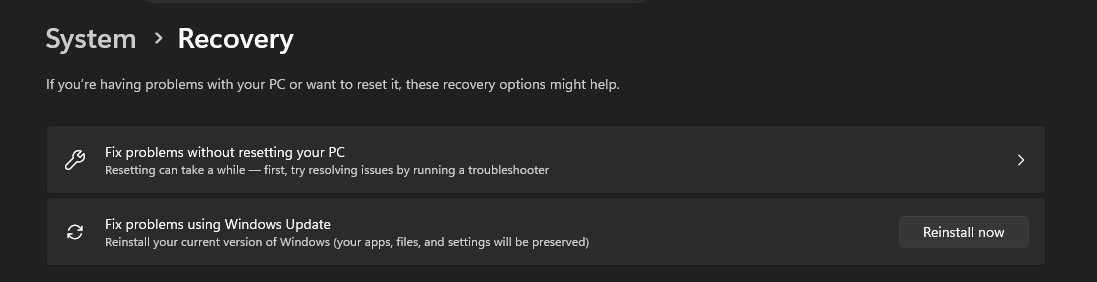
Go to System > Recovery > 'Fix Problems using Windows Update' > Reinstall now
Took about 30 mins for the update finish downloading and installing and another 5 mins after restarting for all the updates to apply but it works!!
The above solution will also keep all of your local apps and files, was looking for anything that wouldn't force me to reinstall all of windows
Peachiko is this only a WIN 11 option? When I look on WIN10 My only options are 'Keep my files' or 'Remove Everything', but my version of 'Keep my files' says it removes apps and settings but keeps personal files...Really dont want to have to reinstall every app on my PC to troubleshoot this game...
phreake yeah this is a win11 option it would seem, for windows 10 if you have a usb you could try an "inplace upgrade" by loading a version of the windows installer you are using and use that to replace your OS files without having to remove everything. If you got extra drives definitely make a backup
On my side I can't even start the game, it's freezing on the first screen with the butterfly.
I tried everything bungie advice but I'm still stuck on that screen. It was working yesterday, so I don't understand where the problem come from.
I did reinstall the windows update, the gpu's driver, clear steam download cache, reinstall the game, whitelist marathon and battleye in windows defender, restart the computer.
I have no third party whatever, it happened after the last update of the game.
My config :
Amd Ryzen 5 7500f
Rtx 5070 12gb
32gb ram
Win 11 pro
Same here, used to be just before loading in a match, after 17th March update now it's just before a match and inside matches too; RTX 5080, Intel Ultra 7 256KF; all overlays off no other software running, clean boot etc; verified files and reinstalled twice. Tried every fix that I've seen suggested on this and similar forums, nothing.
same here i did everything possible, all that i just watch here nothing works.... pls bungie i want to play
I can’t even play the game it just keeps crashing since this last patch I have done every fix mentioned and that I could find? Can we get this addressed I have paid for a product I can’t even play now
My last resort was to upgrade to windows 11 and it fixed my game
Please bungie i did everything mentionned here and i just unistall Windows and reset m’y pc totally i installed Steam nvidia drivers and marathon the game still crash please do something like someone Said before we paid for ure game let us PLAY do something pls
Adding another comment to this maddening issue; I'm only able to play up to 90 seconds of a round before it hangs, audio cuts out, comes back and then CTD.
Was fine before the last update. If Bungie see this, they can request logs.
Bungie Support
I'm sure you guys are busy, but is it possible to get some kind of update on this situation for those of us who are still having trouble even after two weeks. The season's only 3 months long so being unable to get passed the sign-in loading screen for one of those months is really gonna slam the brakes on enthusiasm
I've kinda got a baindaid fix going for myself, what ive been doing is rolling back the drivers on my graphics card (5060TI) and then sometimes restarting my system and that usually works and then it crashes again, in which i update them and restart my system again, i also set my graphics settings to low and play with OBS off (im usually streaming stuff to friends).
サインインしてコメントを残してください。