Bungie Answered
Constant crash since new update

- Bungie Account Name - minijafferz#1498
- Platform - Steam
- Description of Issue - The game will be running smoothly, and there are no issues on the main menu, when accessing the vault/loadout customisation etc. However, since the new update - upon loading into a match the game crashes. This may happen at various times during the match, sometimes immediately upon loading in, sometimes it may take a few minutes. Up until then, the game runs smooth with no issues - however upon the crash, the game freezes momentarily and closes. There are no error messages which pop up. Also - I have tried re-installing the game, verifying the game files, and also reverting my graphics driver to an older version, but none have helped.
- Rough Date and Time of issue - Happens every match (solo, rook runs, and trios) since the new update as of 17/03/2026
- Repro steps - I can't determine any repeatable triggers that cause the crash - the only consistent factor is that it only happens upon starting a match and does not happen on the menu/loadout screen etc.
Specs:
Processor Intel(R) Core(TM) Ultra 9 285K, 3700 Mhz, 24 Core(s), 24 Logical Processor(s)
Installed Physical Memory (RAM) 64.0 GB
GPU Nvidia Geforce RTX 5080
OS Windows
6

Commentaires
Hi there,
Thanks for the report! Rest assured that crashes are automatically reported to us when they occur. In the meantime, we recommend keeping your GPU drivers and Windows version fully updated.
If you experience crashes often, users who haven't done so should please try re-installing the game using the steps in our guide below:
https://help.marathonthegame.com/hc/en-us/articles/39001262917908-Installing-Reinstalling-and-Updating-Marathon
I have the same problem. Your post is better structured than min :) hehe I hope we get some traction and possible solution. Thank you and thank bungie devs
Sorry to hear :..( I've heard a few people having the same issue! Hope they can get it fixed soon - and of course thanks to the devs! :D Been having a blast so far haha
Hi, same issue here. This update SHOULD have been IMMEDIATELY rolled back as it is clearly broken. I dont understand how is this "normal" for developers to release broken products constantly.
Processor Intel(R) Core(TM) Ultra 5 245K, 5200 Mhz, 14 Core(s), 14 Logical Processor(s)
Installed Physical Memory (RAM) 32.0 GB
GPU Nvidia Geforce RTX 5080
OS Windows
Same problem here though mine keeps happening after approximately 30 seconds of loading into the map, running similar specs to you if it may help anyone looking into this bug;
Platform: Steam
Processor: Intel(R) Core(TM) Ultra 7 265K
RAM: 32.0GB DDR5
GPU: Nvidia Geforce RTX 5080
Should probably also mention that there was a recent driver update as of Tuesday, March 10, 2026 Ver. 595.79.
Looking forward to being able to run again, thanks to anyone looking into this issue!
P.S I did try verifying cache and a reinstall.
I will help this "support" with troubleshooting steps that you guys can do and will not fix the issue since this is clearly poorly done by their QA:
Tried to disable real life virus protection,
Disable firewall
Force the game in DX11 and DX12 modes.
Launched the game with admin rights and win7 compatibility.
Forced battleeye reinstallation,
Installed/reinstalled newest C++ Redistributables,
Restarted PC, verified integrity, reinstalled game
All my drivers are up to date.
Same here; won't be playing this for a long while now, lost too much loot to crashes already
RTX 5080 Intel Ultra 7 265K 32.0GB DDR5
same here
Same here, tried many of the things listed above, nothing.
Shame, hoping to get back into it soon.
Specs:
Processor Intel(R) Core(TM) Ultra 9 285K
Installed Physical Memory (RAM) 96 GB
GPU Nvidia Geforce RTX 5090
OS Windows
I have 5 event viewer events related to the crash of the game with Event ID 1001:
However, I am unable to attach .dmp files here but if needed just give me heads up.
Fault bucket , type 0
Event Name: BlueScreen
Response: Not available
Cab Id: 0
Problem signature:
P1: 101
P2: e
P3: 0
P4: ffffb101108d7180
P5: c
P6: 10_0_26200
P7: 0_0
P8: 768_1
P9:
P10:
____________________________
Fault bucket , type 0
Event Name: LiveKernelEvent
Response: Not available
Cab Id: 0
Problem signature:
P1: 141
P2: ffff8407076df460
P3: fffff802443eed90
P4: 0
P5: ffff8407062ac200
P6: 10_0_26200
P7: 0_0
P8: 768_1
P9:
P10:
____________________________
Fault bucket , type 0
Event Name: BlueScreen
Response: Not available
Cab Id: 0
Problem signature:
P1: fc
P2: fffff80763379073
P3: 890000012bcb0121
P4: ffffc809aab16fa0
P5: 2
P6: 10_0_26200
P7: 0_0
P8: 768_1
P9:
P10:
____________________________
Fault bucket , type 0
Event Name: BlueScreen
Response: Not available
Cab Id: 0
Problem signature:
P1: 101
P2: e
P3: 0
P4: ffffb70161582180
P5: b
P6: 10_0_26200
P7: 0_0
P8: 768_1
P9:
P10:
____________________________
Fault bucket , type 0
Event Name: BlueScreen
Response: Not available
Cab Id: 0
Problem signature:
P1: 50
P2: fffff00c79517370
P3: 0
P4: fffff805eaf678e4
P5: 2
P6: 10_0_26200
P7: 0_0
P8: 768_1
P9:
P10:
Hello everyone, I fixed it.
Thank you InFamousKID for this log dump as I dont have it on my PC and it told me enough to resolve the issue.
Please update your BIOS and Intel ME via ME Update Tool assuming you are running Intel CPU. I dont use AMD so I cant help there.
The issue might also be with undervolting your CPU, I did not test it yet as I have put all my BIOS settings to default and just enabled XMP/EXPO
Game works now.
Also thanks to Alex for pin-pointing the issue. It is with intel management engine. Please update your intel management engine to fix the issue.
same exact issue here
tax payer
Please update your intel management engine to fix the issue.
I am having the same issues. Its breaking my heart. I have tried changing my displays, updating drivers, changing resolution, verifying game files, and completely reinstalling the game. It can crash upon loading in to a run or any time during a run.
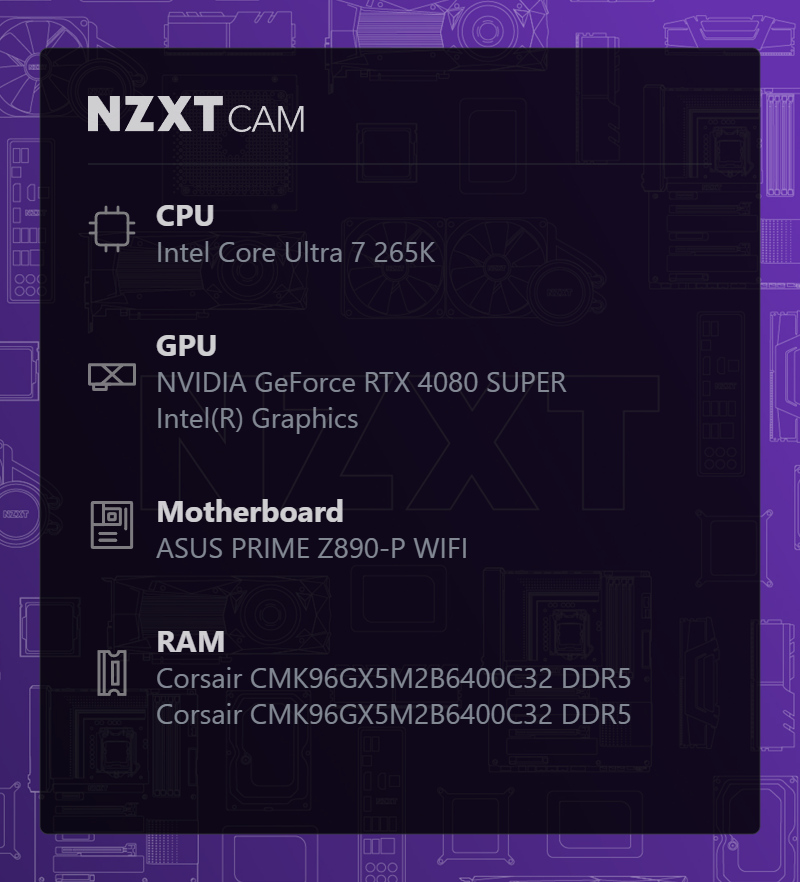
Tommy I did what you said and updated my BIOS and ME and I am still crashing. So it is not an end all solution.
Hi Tommy, just wanted to let you know this worked and you're a lifesaver. I'll be linking this thread to everyone who I come across and has this issue.
I have the same issue, never crashed before new update and now I cant even play the game. Please fix quickly. I also have a 5080
I just updated my BIOS and ME and it worked. Thanks Tommy.
Can confirm updating BIOS and ME worked for me, Thanks Tommy.
Vous devez vous connecter pour laisser un commentaire.