Crash to desktop - Signing in

Every time I click through the main menu and the game starts the sign in loading screen, the game will quickly freeze and then crash to desktop. I've had no issues before this most recent patch.
Things I have tried
- Running as the game as administrator
- Updating my gpu drivers, bios, and windows
- Disabling all overlays
- Verifying game files
- Uninstall/Reinstalling the game
- Disabling my firewall
- Clearing marathon's roaming data
- uninstalling and reinstalling battle eye
Clean boot still ran into the same problem
Event viewer didn't spit out anything when these crashes happened
sfc scan now was not able to find anything and did not repair anything
changing versions of windows and my gpu drivers did not help either (this was with clean installs)
Latest windows updates that came out today did not resolve this either
Here's my pastebin for my dxdiag https://pastebin.com/Drk3H0E9
Was following this ticket but it was fixed after updating to windows 11 which isn't an option for me as I am already on it
https://help.marathonthegame.com/hc/en-us/community/posts/47204533686292-Game-crashes-directly-after-login-loading-screen
He posted a video that is identical to my issue "Here is a video of the issue happening: https://www.youtube.com/watch?v=aboICt52adg"
Feeling really frustrated that it's been almost a week that I haven't been able to get into the game cause I love it so much. Would love an update on the investigation of this or a status update for a hotfix :(
Here's a link to my previous ticket https://help.marathonthegame.com/hc/en-us/community/posts/47140743936148-Crash-to-desktop-Signing-in?page=1#community_comment_47168644435604

Commentaires
Hey there,
Thank you for reporting.
We're happy to hear that you fixed your issue. The game also automatically send a crash report when you're crashing in-game and we're investigating all the crash reports.
i upgraded win 10 to win 11 and it works again, Nothing else helped unfortunately :(
OMG HUGE UPDATE for anyone else having this issue after many many hours of trouble shooting i found my fix, it looks like a big windows update came out at the same time as the patch and reinstalling the current version of my windows worked!
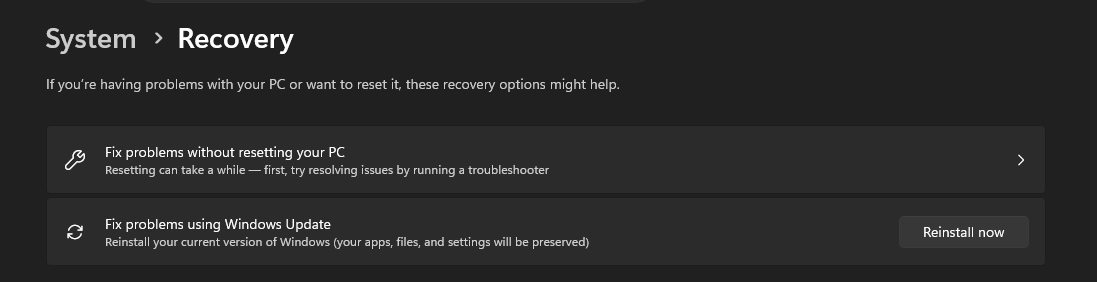
Go to System > Recovery > 'Fix Problems using Windows Update' > Reinstall now
Took about 30 mins for the update finish downloading and installing and another 5 mins after restarting for all the updates to apply but it works!!
Vous devez vous connecter pour laisser un commentaire.