Missing Twitch Drops

Subject: Missing Twitch Drop
Dear Twitch Support,
I am writing to report that Twitch Drops I claimed has not arrived in my game account. Here are the key details:
-
Twitch Username: [binbindaye]
-
Game Account: [steamid:木木彡 steam code:76561198180626443 bungieid:木木彡]
I confirmed the drop was successfully claimed on Twitch (status shows "Claimed" in my Drops Inventory, screenshot attached). I have already:
-
Verified my Twitch and game accounts are still linked properly
-
Restarted the game and checked all in-game storage locations
-
Cleared browser cache and reloaded the Twitch Drops page
Could you please assist in verifying the drop's delivery status and help resolve this issue? I have attached the claim confirmation screenshot for your reference.
Thank you for your support.
Best regards, [木木彡]
Attachments:
-
Screenshot of Twitch Drop claim confirmation
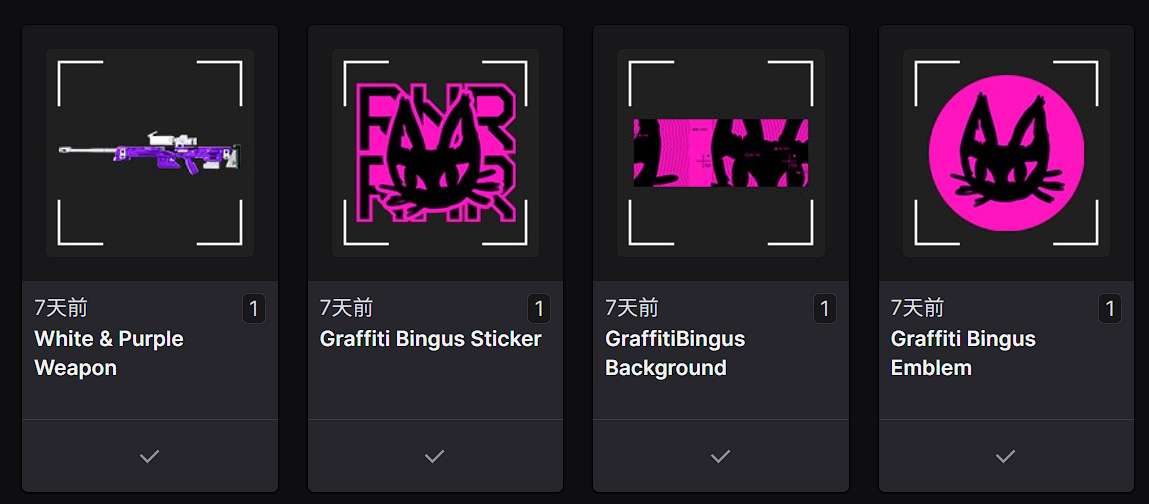
-
Screenshot of Twitch-game account link status



Comentarios
Hi there,
Thank you for reaching out.
Players should be advised that in order to participate in Marathon Twitch Drops, they'll need to ensure that their Bungie account is successfully connected to their Twitch account no less than 12 hours prior to the start of any Marathon Twitch Drop event. If a player connects any later, it cannot be guaranteed that their connection will be active in time for the scheduled Twitch Drop event.
If you were unable to connect your account at least 12 hours prior to the event, there is no guarantee that you will receive your drops.
For more information, please visit the Twitch Drops page.
https://help.marathonthegame.com/hc/en-us/articles/39003946742676-Twitch-Drops
Iniciar sesión para dejar un comentario.