Bungie Answered
PS5 thief drone on controller

The thief drone is not firing on controller.
I changed the mapping in character but didn’t touch the drone mapping.
In menu it says R1 to fire.
In game no button is triggering the fire.
4

Comentarios
Hi there,
Thank you for reaching out and for reporting this.
Could you first try resetting the key mapping and see if the drone functions again?
If that doesn't fix the issue and you are able to replicate this, please use your platform's capture button to take a video. You can upload the footage to a public video hosting site, like YouTube, then post the link here and we’ll be glad to take a look.
I am having the same issue on Xbox. I have not changed any 'runner device' keybinds. However, I have changed multiple 'character' keybinds including 'RB'/'R1' to have multiple functions (which both functions are working perfectly as intended) I believe these keybind changes are likely the source of the issue, but I shouldnt have to go back to default keybinds for my drone to work. What I am noticing is there is no keybind setting for the drone's grapple ability (atleast I'm not seeing it.. tried changing both 'craft action' keybinds multiple times now with neither of them enabling me to use the drone's grapple) I attached screenshots of my current keybinds if that helps, but there is no video footage to show since the drone has never fired its grapple with my custom keybinds.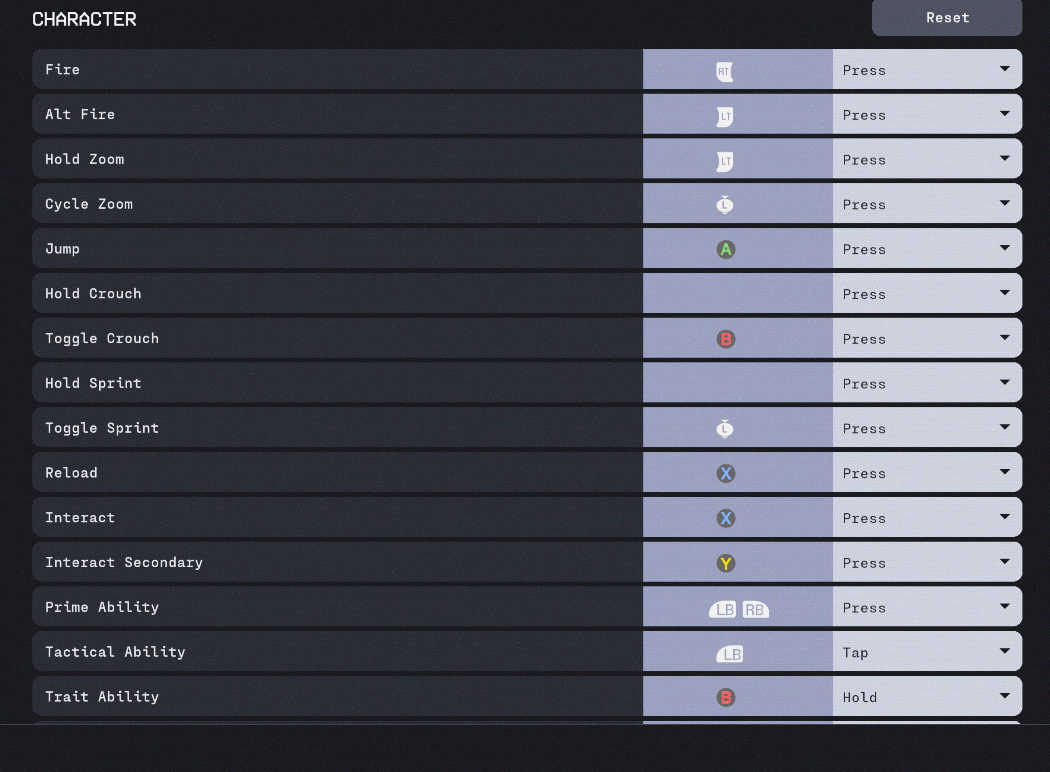
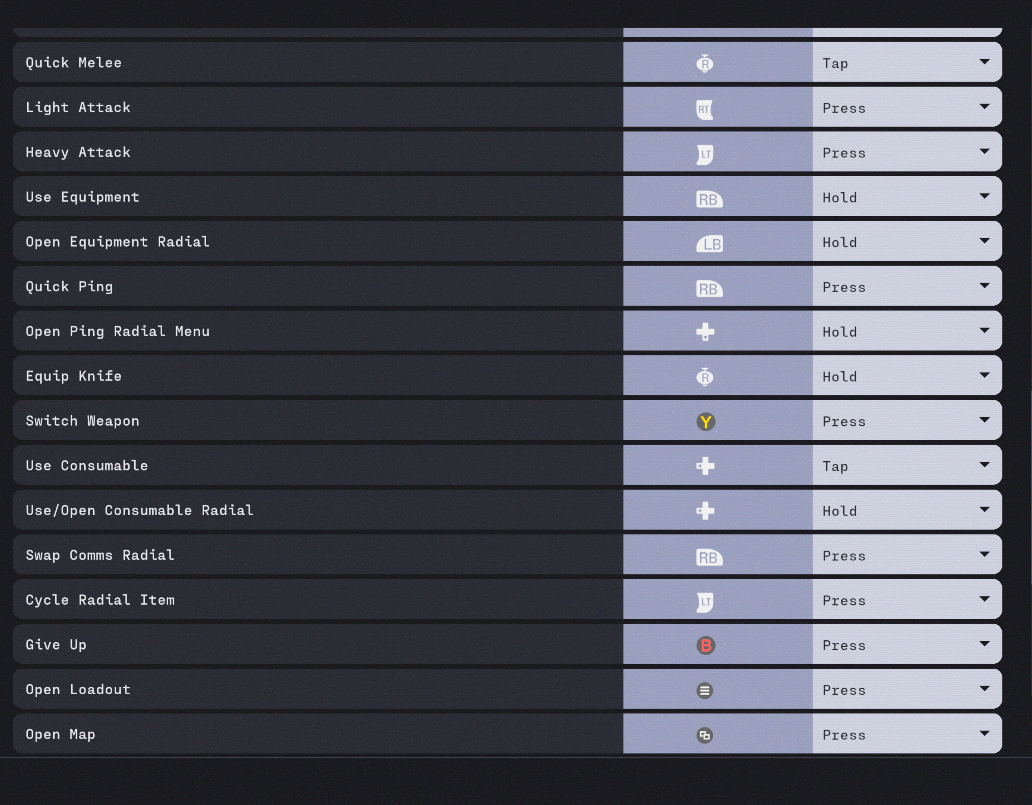
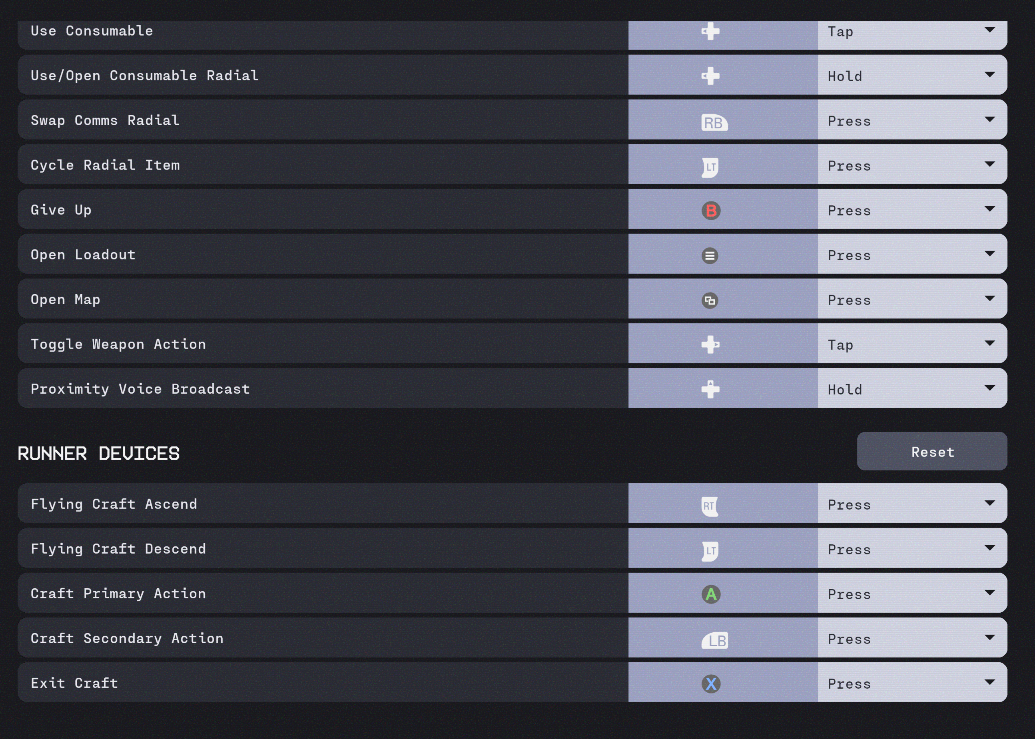
So after some further testing I have found that you MUST hold down whatever keybind you have set for 'use equiptment'. Now maybe since I have always had my 'use equiptment' keybind be 'hold' that might be why its requiring me to hold down that button instead of just pressing it. It would still be a welcome change if the thief drone's grapple action had its own keybind seperate from your 'use equiptment' keybind.
My issue was that I changed the R1 from press to tap (because i use tap for equipments and hold to see equipments) but this made the drone R1 non functional. Changing it back to press fixed the problem but now I am not able to hold properly when trying to use the equipments wheel.
Hi there,
The grapple ability for the Thief's drone is tied to the Tactical Ability and not to the Use Equipment keybind. Could you try adjusting your keybind with the Tactical Ability and see if the drone's grapple works correctly?
Hi There,
This still an issue. Wondering if you're looking into it? For context, i'm on Xbox and I have remapped pretty much all my controls. When i use the Thief drone, no matter what button i press none of it activates the drone's whip. Weirdly, when i use the alt lock function, the drone simply drops vertically to the ground. Help.
The last message from bungie support is wrong.
It’s definitely not tied to the same button and tactical ability and is in fact the equipment button.
Anyone can test and see this easily. Also if you make alterations to the equipment button you can end up disabling the drone steal ability whilst changing the tactical ability is fine.
Checking in on this. It’s been an issue since launch
Why has this still not been addressed by Bungie?
It’s quite literally tied to ‘use equipment’. The craft primary and secondary actions have absolutely zero use.
It’s been months to get this addressed for console.
I’m experiencing 5hesame problem, still no solution yet?
I’m experiencing the same issue where I’ve bound equipment wheel to R1 hold, and use to R1 tap, which disables the drone tether. So far, my workaround is to use double press for equipment use, but it’s been extremely annoying, and not worth adapting to an awkward setup just to use the drone properly.
Seems like the command only fires with ‘press’ type inputs, and doesn’t work with ‘tap’ inputs. Please add the tether as it’s own command in the runner device section.
The game already pushes the boundaries of controller button limits. Every command and button bind really affect gameplay on a deep level.
Iniciar sesión para dejar un comentario.