Bungie Answered
Proximity chat isn't working?

I have made sure my Microphone input is correct and voice output is correct.
When I hold the prox chat button the icon on the bottom left changes to an orange speaker with an x next to it. When I speak the icon doesn't change. 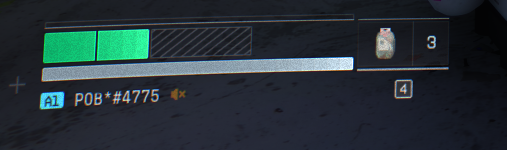 I've tried talking to people and no one is replying so I think for whatever reason I cannot talk?
1

Comments
Hello there,
Thank you for your report.
We have received reports of players experiencing issues with voice and game chat. At this time, we're investigating the underlying cause of these issues. Your patience and understanding while we investigate is appreciated.
After the patch that released today I still have the same issue.
I have the same issue, team chat works fine but prox chat does not
I am having a similar issue on Xbox. My team can hear me but proximity chat does not work. I am on a series x with an arctis 7 pro wireless headset. Hopefully Bungie can figure it out. I wish I could talk to my fellow rooks. My other thought is I played on PC once before, maybe some settings are carried over and conflicting.
I figured out my issue, I had accidentally clicked my own icon in the bottom right corner which mutes yourself. Once I unmuted myself I no longer have the X next to the icon and it seems like prox chat is working now.
I haven't been able to use proximity chat at all. Crew chat works just fine so I know it's not my headset. I've tried disabling and reenabling everything. I've tried resetting all the social settings and turning prox chat back on. I've tried reinstalling. I've made sure I'm not muted, and tried both tapping and holding no matter how I have it set. I've run things in ad-hoc groups where I had to mime my way into it, but I can't tell them about anything they are doing wrong and that is not the least of the issues with prox chat not working. It's astounding a company has all of these resources and can't get this to work. For reference I'm using a SteelSeries Arctis Nova 5.
Please sign in to leave a comment.