BattleEye causing game and computer crashes [Steam]

I have a Focusrite 8i6 audio interface (sound card), when it is plugged in and turned on and Marathon is launched, it causes the KERNEL_SECURITY_CHECK_FAILURE (0x139) blue screen, and forces my computer to restart. Some have said that going to device manager and disabling the Focusrite MIDI driver lets the game start, but that does not work for me.
Only when I turn my Focusrite off physically, I can start the game.
However, when the game is started, it will immediately freeze at the loading screen complete with the little Steam notification stuck on the screen that I'm now playing Marathon. I let it sit there for fifteen minutes and it didn't budge. The only way to exit out of it is to force quit Marathon through the task manager on another monitor.

Comments
This is essentially what is happening to a friend of mine who has a Scarlett interface — he was able to get the game to stop crashing by disabling it, but he can't actually get the game to run, though it says "Running" in the Steam sidebar. It seems like it must be BattlEye related but I haven't heard any solutions so far.
I have this issue too. I can play the game if I turn off my Scarlet Focusrite. The problem is my standard gamer headset has a trash mic, and people say it's always open with static.
Thus I'd like to be able to use my audio interface.
Won't buy the game if I can't use my audio interface, as I don't want to be abusing peoples ear holes.
Same issue here! I have focusrite scarlet 18i8 and only thing that helps if i turn the DAC off.
This issue was fixed for me personally as of last night.
I'm not sure if Bungie needs specific versions of the various hardware people have in order to fix the problem, but I have a feeling it may be back some time I'm the future as this is sorted out. Will keep everyone posted.
Confirming this issue with Scarlett 4i4 (gen 4). Only thing I can do is physically disconnect the device each time I want to play.
Having the same issue. Does anyone know if they patched this yet?
I have the same problem with Dune Awakening and a 6i6.
I uninstalled the Focusrite device from the device manager, checked box to remove the driver, scanned for hardware changes, now it's loading fine with audio working
I'm still not buying till this is fixed. If anyone ever does get it working with their focusrite, please do post here :)
Yeah, it's annoying to not be able to use the latest driver. Probably should open a ticket for BattleEye and Focusrite since the error is between those two.
I am also having this issue with my GO XLR, this isn't related to just Focusrite it seems to be a lot of audio interfaces. I have no other way of powering my microphone so if this isnt fixed I cant use comms. Weird youd think this would be a huge streamer issue that bungie would be onto asap.
tried all the solution, still now working.plshelp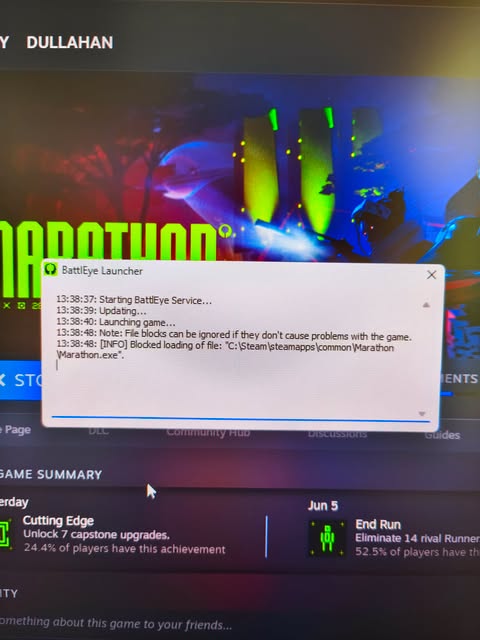
Please sign in to leave a comment.