Bungie Answered
Game doesn't even launch

My game loads up the BattlEye Launcher and then shows this: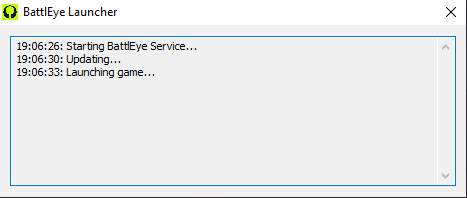
After roughly 30s it dissapears off my screen and Steam acts as if the game itself shut down (I'm assuming it's crashed). I am most likely guessing it's due to my computer having legacy specs (Intel i7-4960x CPU, NVIDIA 980ti GPU, DDR3 RAM etc.).
22

Comments
Hello there,
Thanks for reporting this issue. If you see this happen again post-launch, please try to capture footage and let us know.
Getting the same issue. BattlEye pops up, Game process launches, CPU usage goes up, back down, then the process disappears and Steam tells me the game is not running anymore. I tried re-installing the game, re-starting Steam, re-starting the computer, uninstalling and re-installing BattlEye.
Specs:
CPU: i7 3770k
GPU: Nvidia GTX 1080 8GB
RAM: 32GB DDR3 2333Mhz
Mainboard: Asus Maximus V Gene
OS: Windows 10
EDIT: To clarify, the CPU usage goes up to around 16%, then back down, then the process just stops.
EDIT2: I do also have the most up-to-date drivers installed.
EDIT3: I also can run Destiny just fine at decent framerates and settings.
Im running an i7-9700 and a GTX 1060 and ddr4 having the same problem at the moment.
Same happening to me. I also have old hardware but I can run Arc Raiders which is slightly higher minimum requirements (not by much). Of course it's not the same engine so I don't know. But seems like you guys are also having the same issue.
I have the same issue except steam acts as if the game is running and i see it in the task manager but it doesn't even boot up to crash.
The worst part, the one that i don't understandm, is that i played the Playtest just fine without any issues. But now i can't even launch it
Kheryn Hoping that its just something on their side they need to update because this is quite frustrating.
waited so long for this. what bs tbh
My game is failing as well in the same way. after battle-eye initialization the .exe fails sillently. Here's the logs from Event Viewer. I have an intel i7 3820 cpu
Faulting application name: Marathon.exe, version: 40558.0.0.0, time stamp: 0x698d8af8
Faulting module name: Marathon.exe, version: 40558.0.0.0, time stamp: 0x698d8af8
Exception code: 0xc000001d
Fault offset: 0x00000000321a28d8
Faulting process id: 0x100
Faulting application start time: 0x01dca7648b64d85c
Faulting application path: C:\Program Files (x86)\Steam\steamapps\common\Marathon Server Slam\Marathon.exe
Faulting module path: C:\Program Files (x86)\Steam\steamapps\common\Marathon Server Slam\Marathon.exe
Report Id: c582d8ec-7a56-4494-b883-bf1fca9724a8
Faulting package full name:
Faulting package-relative application ID:
same: running i7-2700k 16GB DDR3, gtx 1070.
i realize this to be very old hardware, but it did just fine during playtests. now it would do more than OPs described issue.
(cant find the crash logs/battle eye logs)
event viewer:
Faulting application name: bad_module_info, version: 0.0.0.0, time stamp: 0x00000000
Faulting module name: unknown, version: 0.0.0.0, time stamp: 0x00000000
Exception code: 0x00000000
Fault offset: 0x0000000000000000
Faulting process id: 0x1628
Faulting application start time: 0x01dca76cb2e4b59b
Faulting application path: bad_module_info
Faulting module path: unknown
Report Id: 2f95f35d-b390-4e7a-bc78-43857ddd94d2
Faulting package full name:
Faulting package-relative application ID:
Kheryn Yeah I've got the same issue as you do
Same here
3060 TI
i9 14900K + RTX 4080 Super and I have the same problem
I am also having this issue. Is there a fix yet?
OfficerBacon1127 unfortunately no :(
Wild, I was able to play during the Playtest just fine but now I have the same Battle-eye issue.
Guys wth so many hours since the server slam start and still the same issue. This is frustrating.
same here, RX 580
Same here
RX 580
I bet it won't be fixed. Bungie and Sony don't need your dirty money.
And the funny thing is that it's most likely because of BE, which is absolutely the worst anti-cheat, which does not interfere with cheats in any way and only destroys the stability of any product.
Having the same issue , no acknowledgement that the issue is even being looked from the support team or if there even paying attention to these forums for feedback. What a huge fail from bungie
The game is releasing next week and they still have so many issues going on... I just don't get why they didn't do this server test sooner from launch. Anyway, almost one day since the server slam started and I just can't get the game to run and nobody seems to care. I'm just going to pass for now, money stays in the wallet.
Same BS, I tried on win10 and win11, reinstalled and did literally everything, but zero result. Xeon, 32gb RAM, RX5950XT. All games on ultra but this bs even can't run
Bungie Support
having the same issue :/ at least i can confirm that turning off vpn does not resolve it. May be irrelevant, but at least it's out there
I have uninstalled and redownloaded the game multiple times, I even did a fresh reset on my pc and it still doesn't work. Literally have tried everything imaginable to make it work but battle eye is known for these issues. Especially with AMD hardware and software. Just wait for bungie to release a fix if they do. I'm 99% sure its not a player side issue.
Same issue. I tried multiple ways of reinstalling BattlEye and Marathon. I updated drivers. I ran clean boots. I updated redistributables, disabled CFGs, ran SFCs, deleted other anti-cheats, physically removed interfaces. Nothing. Never got past the launcher OP showed. If this shit isn't fixed by the 5th, I'm refunding the game. This is complete bullshit, Bungie.
I'm having the same issue. I meet the min. requirements and then some, I play other new titles just fine. I waited a while for this game and now it seems not only will I not be able to try it out, but I wont be pre ordering the deluxe like I planned. Sad thing is I'm one of those few that kind of know for 100% they will love this game despite its faults. The same way I bet a lot of you did last November. I figured this is the place to rant not Steam its not safe there right now.
I hope that this problem will be fixed closer to the release, because I don't really want to cancel the pre-order of this game, I see a huge potential in it.
Wildest part is I was bale to play the closed tech test just fine, but cannot take part in the server slam. Worst yet is that I know bungie wont reimburse us for our lost time to participate in the server slam. We dont get to grind out the starting loot like everyone else.
This piece needs avx support. And in order for instruction processing to be forcibly turned on, I had it turned off. Check your processors.
Please sign in to leave a comment.