Sie haben nicht gefunden, wonach Sie suchten?

Neuer Post
Bungie Answered

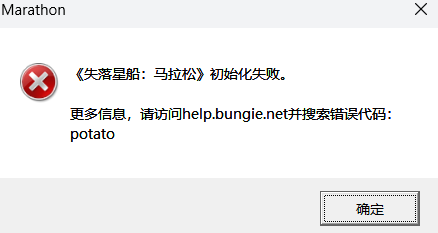
Game initialize failed, error code potato

System:

  • 32GB RAM
  • RTX 4080
  • Windows 24H2
  • Intel(R) Core(TM) i7-14700K
0

Kommentare

  • Offizieller Kommentar

    Hi there,

    Thanks for reaching out.

    I'm sorry to hear that you are seeing this error code.Could you please try the following to see if it helps resolve the issue:

    • Fully close Marathon and reboot your PC
    • Verify or Repair the game files and lauch the game again
      • Steam: Library → right‑click MarathonProperties…Installed FilesVerify integrity of game files.
      • Epic: Library → click the on MarathonManageVerify.
    • Run the launcher and game as administrator
    • Whitelist Marathon and BattlEye in your Antivirus software
     
    您好,
    感谢您的联系。

    很抱歉您遇到了这个错误代码。
    请尝试以下步骤,看看是否能解决问题:
    完全关闭 Marathon 并重启电脑 验证或修复游戏文件,然后重新启动游戏
    Steam:库 → 右键单击​​ Marathon → 属性… → 已安装文件 → 验证游戏文件的完整性
    Epic:库 → 点击 Marathon 旁边的… → 管理 → 验证
    以管理员身份运行启动器和游戏
    将 Marathon 和 BattlEye 添加到您的杀毒软件白名单
    我使用了翻译软件,如有任何误解,敬请谅解。
  • thanks for reply!

    I tried the actions one by one (start the game after each step) and find the root cause is the Antivirus software.

    Everything works well after whitelist the marathon folder.

    Hopeful this message can help others who get similar issue

    0

Bitte melden Sie sich an, um einen Kommentar zu hinterlassen.